Follow these steps to securely withdraw your crypto assets:
Step 1: Go to Your Wallet
Navigate to “Wallets” and select “Spot” from the top navigation menu.
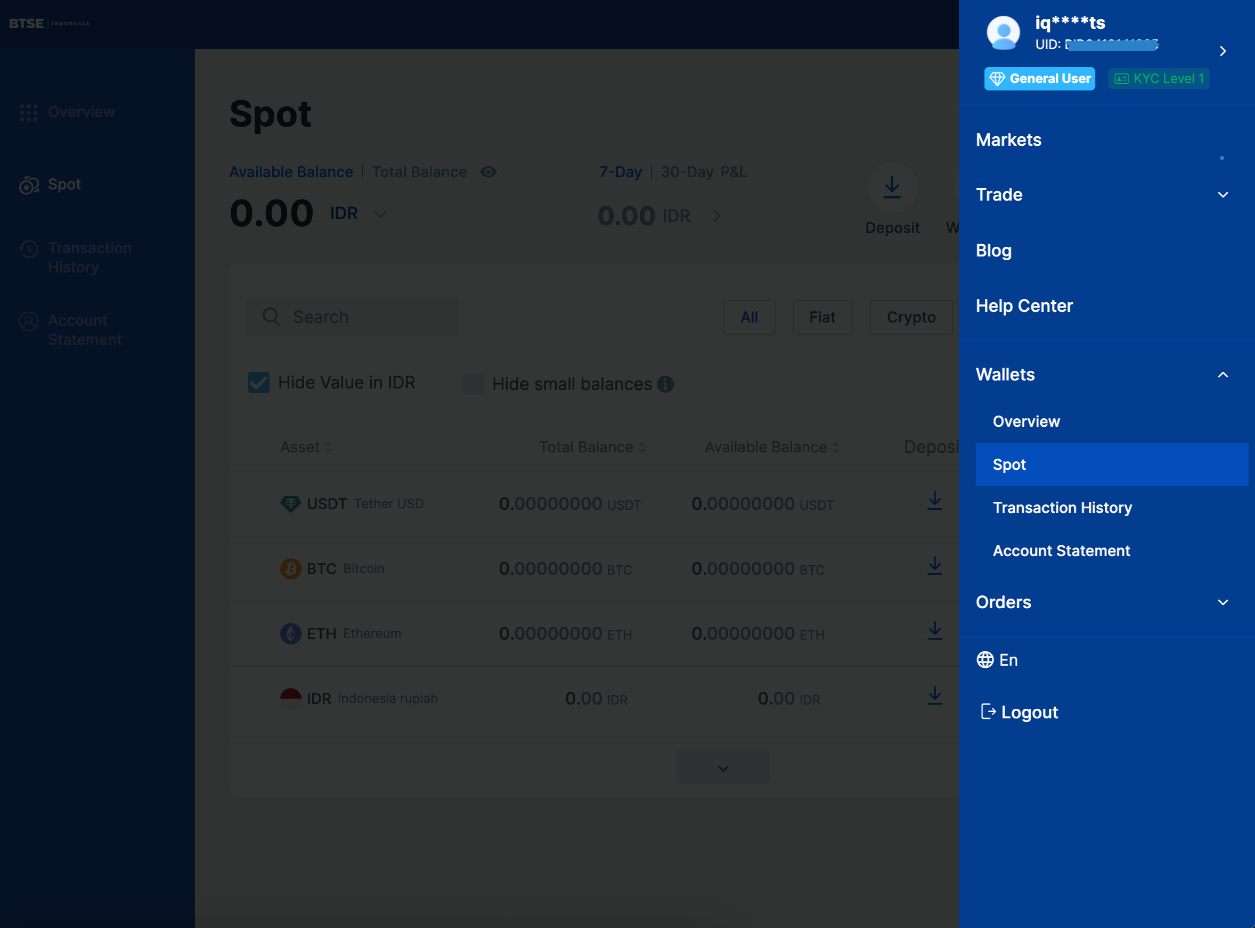
Step 2: Start a Withdrawal
You can initiate a withdrawal in two ways:
- Click the “Withdraw” button at the top of the page; or
- Select a specific cryptocurrency and click the corresponding “Withdraw” icon (this will skip Step 3).

Step 3: Select Cryptocurrency
Choose the cryptocurrency you wish to withdraw.
Then, select the appropriate network and withdrawal method, and click “Next.”


⚠ Important:
Selecting the wrong cryptocurrency or network may result in permanent loss of funds. Always double-check the details before proceeding.
Step 4: Enter Withdrawal Details
Enter the withdrawal amount and the destination wallet address, then click “Withdraw.”

Step 5: Confirm the Transaction
Check your registered email for the verification code.
Enter the code along with your 2FA (Google Authenticator) code, then click “Confirm.”

Step 6: Wait for Processing
Once the transaction is successfully submitted, you will receive a confirmation on your screen.
⚠ Note:
The verification link will expire after 1 hour, so please complete the process promptly.

Need Assistance?
If you encounter any issues or need further help, please contact our Customer Support team.

